

 Suleman Chitera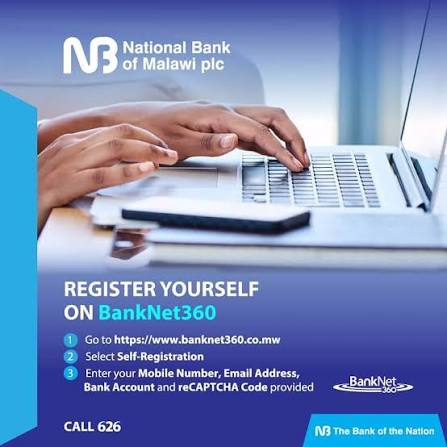
By Suleman Chitera
BankNet 360 is National Bank of Malawi (NBM) plc’s internet banking platform that allows personal, SME and corporate customers to access and manage their bank accounts digitally without having to visit a physical branch.
The platform is designed to provide customers with convenient access to banking services 24 hours a day, seven days a week, using an internet-connected device. According to NBM, BankNet 360 can be accessed from anywhere in the world.
What is BankNet 360?
BankNet 360 is NBM’s web-based internet banking service. It gives customers access to their accounts through the BankNet 360 platform and allows them to perform various banking transactions electronically.
The service is available to personal, SME and corporate customers, making it useful for individuals as well as businesses that need to manage their finances remotely.
The platform forms part of NBM’s broader digital banking strategy, alongside services such as Mo626 Digital+. NBM says its digital channels are intended to make banking more convenient and reduce the need for customers to visit service centres for routine transactions.
BankNet 360 Features
BankNet 360 provides customers with a range of online banking services. Key features include:
1. 24/7 account access
One of the main advantages of BankNet 360 is that customers can access their accounts at any time.
Unlike traditional branch banking, customers do not have to wait for a service centre to open before checking or managing their accounts.
2. Account transactions
The platform allows customers to carry out basic account transactions electronically.
This can be particularly useful for customers who live far from an NBM branch or who want to manage their finances outside normal banking hours.
3. Money transfers
BankNet 360 supports transfers between accounts and transfers to other banks, subject to the applicable NBM charges and transaction rules.
For personal customers, NBM’s published tariff lists transfers to other banks through BankNet 360 at K700 per transaction, while transfers within NBM and MRA tax payments are listed as free in that tariff.
4. Transfers to mobile money
Customers can also transfer funds to mobile-money-operated wallets through BankNet 360.
NBM’s published personal banking tariff lists the charge for transfers to mobile money-operated wallets at K600, while transfers to a Mo626 wallet are listed at K650.
5. Recurring payments
The platform also supports recurring payments to other banks.
This can be useful for customers who regularly make payments and want to manage them electronically rather than repeatedly visiting a branch.
6. Cardless withdrawal token generation
BankNet 360 also provides a token-generation facility for cardless withdrawals. NBM’s tariff lists token generation for cardless withdrawals as free, although redemption charges may apply depending on where the withdrawal is made.
How to Register for BankNet 360
Customers can register themselves on BankNet 360 or receive assistance from NBM.
According to NBM’s product information, registration results in the customer receiving a username and password for accessing the platform.
NBM promotional material indicates that customers registering themselves should have their mobile number, email address and account number available.
Customers can access BankNet 360 through the dedicated platform or through NBM’s website and the BankNet 360 link.
How to Log Into BankNet 360
Once registered, customers can access BankNet 360 using their login credentials.
The basic process is:
- Open the BankNet 360 platform.
- Enter your registered username.
- Enter your password.
- Complete any required security verification.
- Access your account and available banking services.
Customers should never share their passwords, one-time passwords (OTPs) or other authentication information with another person.
Is BankNet 360 Safe?
Security is a major consideration when using online banking.
NBM says BankNet 360 uses user IDs, passwords and OTPs delivered to the customer’s mobile phone and/or email inbox as part of its security measures.
However, customers also have an important role to play in protecting their accounts.
Customers should:
- Never disclose their password to anyone.
- Never share an OTP.
- Avoid logging into online banking through suspicious links.
- Check the website address before entering banking information.
- Avoid using online banking on unsecured public computers.
- Keep their mobile phone and email account secure.
- Report suspicious transactions to NBM immediately.
BankNet 360 Charges and Fees
BankNet 360 is not necessarily completely free. NBM’s charges depend on the type of customer and transaction.
For personal customers, NBM’s published tariff effective 10 February 2025 lists a K3,300 monthly service fee for BankNet 360. It also lists K700 for transfers to other banks, K600 for transfers to mobile-money-operated wallets and K650 for transfers to a Mo626 wallet.
NBM’s BankNet 360 fact sheet lists different monthly fees for customer categories, while its corporate tariff provides separate charges for corporate and SME customers. Customers should therefore check the latest NBM tariff before relying on any specific fee because banking charges can change.
BankNet 360 for Businesses
BankNet 360 is not limited to individual customers.
SMEs and corporate customers can also use the platform to manage banking activities electronically.
NBM’s corporate tariff includes BankNet 360 and BankNet Online under its internet banking services, with separate charges for different types of transfers and recurring payments.
For businesses, online banking can reduce the time employees spend travelling to branches and make it easier to manage routine payments and transfers.
BankNet 360 vs Mo626 Digital+
BankNet 360 and Mo626 Digital+ are both NBM digital banking services, but they serve different primary purposes.
BankNet 360 is NBM’s internet banking platform, accessed through the web.
Mo626 Digital+ is NBM’s mobile banking platform designed for use through a mobile application. NBM launched the two services as part of its digital banking offering.
Customers can therefore choose the digital channel that best fits their banking needs and device usage.
Benefits of BankNet 360
BankNet 360 offers several potential benefits to NBM customers.
Convenience
Customers can perform banking transactions without physically visiting an NBM branch.
24-hour access
The service is designed to provide access to accounts around the clock.
Faster banking
Electronic transactions can save customers the time associated with travelling to a branch and waiting for service.
Remote access
Because BankNet 360 is web-based, customers can access the service from different locations with internet connectivity.
Digital financial management
The platform gives customers greater control over routine account transactions through an online channel.
Who Can Use BankNet 360?
NBM says BankNet 360 is available to retail, SME and corporate customers.
This makes the platform relevant to a broad range of users, from individuals managing personal accounts to businesses handling regular payments and transfers.
Where to Access BankNet 360
Customers can access BankNet 360 through NBM’s official digital banking platform.
NBM’s published product information directs customers to banknet360.co.mw or to the BankNet 360 link on the NBM website.
For security, customers should access online banking through NBM’s official channels rather than links received through unsolicited messages, social media posts or unknown websites.
Frequently Asked Questions About BankNet 360
What is BankNet 360?
BankNet 360 is National Bank of Malawi’s web-based internet banking platform that enables customers to access their accounts and perform banking transactions online.
Is BankNet 360 available 24/7?
Yes. NBM describes the platform as providing customers with access to their accounts 24 hours a day, seven days a week.
Can I use BankNet 360 on my phone?
Yes. Because BankNet 360 is web-based, it can be accessed using an internet-connected device, including compatible smartphones, tablets and computers.
Can I transfer money using BankNet 360?
Yes. BankNet 360 supports transfers, including transfers to other banks and mobile-money-operated wallets, subject to applicable fees and limits.
Does BankNet 360 have a monthly fee?
Yes. The applicable fee depends on the customer category and the current NBM tariff. NBM’s published personal banking tariff lists a K3,300 monthly service fee for BankNet 360.
Is BankNet 360 secure?
NBM says the service uses user IDs, passwords and OTPs as security measures. Customers should nevertheless protect their login credentials and never disclose OTPs or passwords.
Conclusion
BankNet 360 represents an important part of National Bank of Malawi’s move towards digital banking. By providing online access to accounts and electronic transaction services, the platform allows personal, SME and corporate customers to conduct routine banking activities without always having to visit a physical branch.
For customers considering BankNet 360, the most important issues are understanding the available services, completing registration correctly, protecting login credentials and checking NBM’s latest tariff before making transactions.